CallBill3 Health Checks
It is recommended to perform routine CallBill health checks to ensure that call logging and processing are functioning as expected. Depending on the telephone switch type and the method used for CDR collection; this may involve reviewing one or more CallBill modules.
CallBill Record Processor:
The Record Processor module is responsible for periodically retrieving call records from the telephone switch and storing them in the CallBill site database. During this process, the cost of each call is calculated based on the tariff rules/values applicable to the originating site.
Call Processing: By default, the Record Processor is configured to poll at 3:00 a.m. This schedule can be modified through the File → Schedules window. For each polling session, the Record Processor communications window displays the polling details with date and time stamps.
- The key metric to verify is the number of completed records.
- Any error or warning messages will be highlighted in red and should be reviewed and addressed promptly.
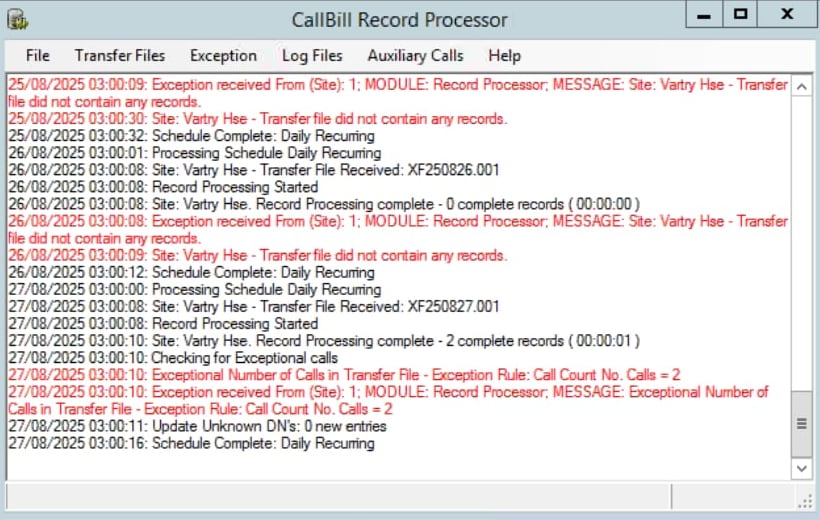
Event Logs: The Record Processor generates a daily event log file, which can be accessed through the Log Files → Event Log Files option on the main menu bar.
- File Naming Convention: Event log files follow the format cbrpYYMMDD.log, where: YY = Year, MM = Month, DD = Day
- Missing Log Files: If a log file is not present for a given date, this indicates that the Record Processor was not running on that day.
Archive Folder: Once polled CDR files have been successfully processed, they are archived locally for up to three months.
- Default Path: C:\CallBill3\Rec_Pro\archive\site1
- Verification: Reviewing the archive folder ensures that a CDR file was polled each day for the last three months. Missing files may indicate a failure in polling or processing.
CDR Collection Check:
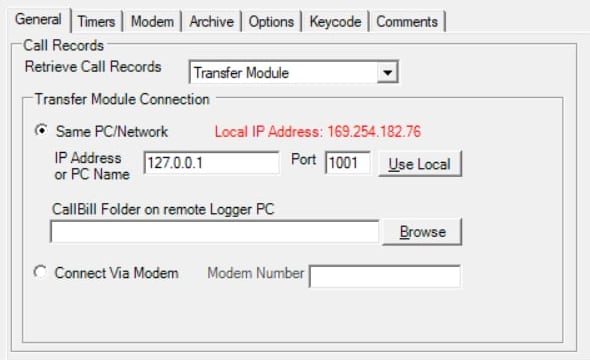
If the Record Processor 'Call Processing' check is showing zero complete records then the CDR collection method should be reviewed. The collection method is determined by the type of telephone switch in use. This can be confirmed by viewing the Record Processor File/Site window, selecting the General tab and viewing the 'Retrieve Call Records' setting.
Transfer Module: this setting is used when collecting the CDR data via a Logger Module. The IP address can be configured as either the loopback IP (127.0.0.1) or the local machine’s IP address. This method is typically used for CS1000 serial connections, IP Office and Avaya CM systems.
DBA Retrieval: this setting is used when collecting the CDR data directly from the CS1000 Call Server.
PC/Network Folder: this setting is used when collecting the CDR data from a Cisco CUCM system. The folder path should be pointing to the SFTP depository folder on the CallBill PC, which receives the CUCM CDR files via SFTP.
Connection Issues:
Transfer Module connection issues.
- Ensure that the Transfer Module and Logger Module are running.
- Confirm that the Logger Module is receiving CDR records from the telephone switch. The Logger – Switch connection details can be verified via the main menu Connection/Telephone System window.
DBA Retrieval connection issues.
- Verify that the CallBill PC is on the same network as the CS1000 Call Server (e.g., using a ping test).
- Confirm that the FTP credentials are correct.
PC/Network Folder connection issues.
- Ensure that the SFTP depository folder is receiving the CDR files from the Cisco CUCM.
- If no files are appearing in the SFTP depository folder check that the SFTP server application (e.g. Solarwinds SFTP/SCP server) is running.
- If the SFTP server application is running check the CDR SFTP configuration on the Cisco CUCM.
Reports Module:
If the Record Processor Call Processing check shows a number of complete records, it is recommended to run some test reports to confirm that the calls are processing correctly.
1. Daily Call Count Report
- Location: Summary or Custom Reports folder.
- Purpose: Displays the number of external outgoing calls per day for the selected reporting period.
- Use: Verify that there is call data recorded for each day.
2. Call Details with Extension Report
- Location: Detailed Reports folder.
- Purpose: Provides detailed call information, including extension usage.
- Use: Confirm that external outgoing calls are processed accurately by checking:
- The Area Dialled field corresponds correctly to the number dialed.
- The Cost field reflects the correct tariff for the call type and duration.
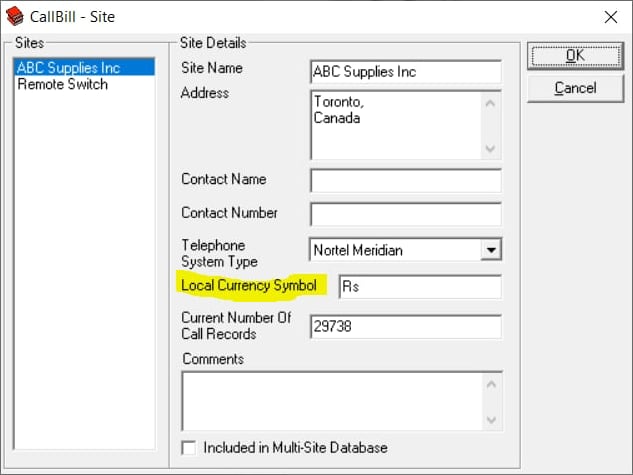
Note: Tariff rates are usually displayed in local currency. If the currency symbol is incorrect, it can be updated via the Site window in the main menu.
3. Summary by Department Report
- Location: Summary Reports folder
- Purpose: Displays call activity grouped by department.
- Use: If departments have been assigned to CallBill User Identifiers, run this report to confirm that department data is displaying correctly.
4. User Identifiers Verification
- Purpose: Ensure that all User Identifiers are accurate and up to date.
- Use: Verify via the User Details window in the main menu.
Contact:
If you require technical support, contact Phoneware's Technical Support Helpdesk:
| Email: | support@phoneware.ie |
| Telephone: | +353 404 68711 |
| US Toll Free: | 1-800 660 9248 |