J179 Background (Aura)
To set a custom J179 background on Aura, there are two steps:
- Upload a suitable image file...
- the image file(s) must be 320×240 jpegs (.jpg), 16 bit color, and less than 256KB. - Edit the
46xxsettings.txtfile...
- the following lines are added for the background image(s):
| BACKGROUND_IMAGE | [filename.jpg] | List of images, comma separated, in brackets |
| BACKGROUND_IMAGE_DISPLAY | [filename.jpg] | Administrator choice of default background image |
| BACKGROUND_IMAGE_SELECTABLE | [0..1] | Allow end user to change backgrounds: 1=yes, 0=no |
Files are handled through the Aura Utility Services web interface:
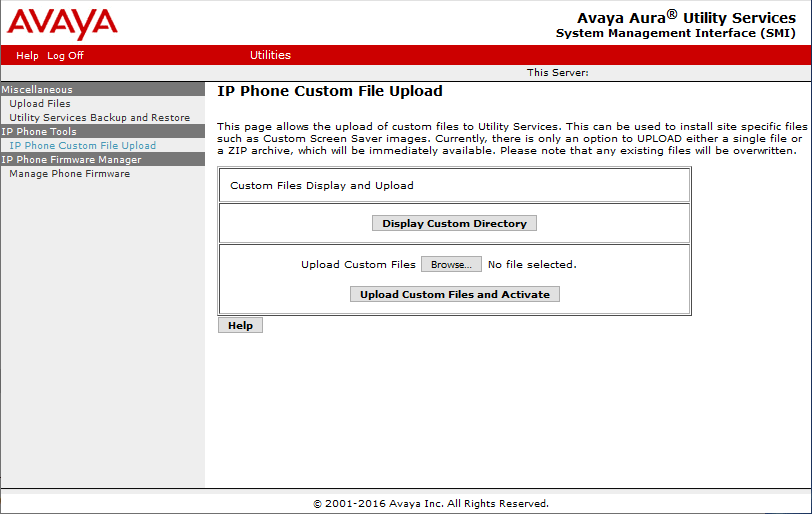
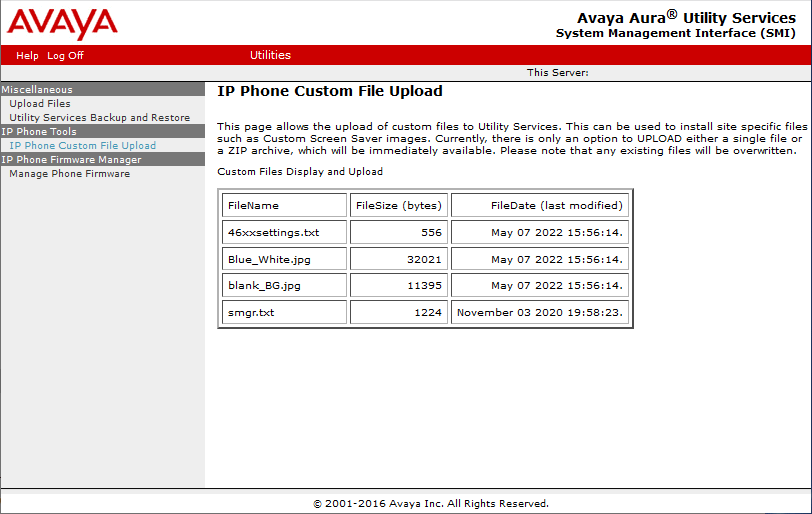
Select IP Phone Custom Upload from the left menu, then Display Custom Directory, or Upload Custom Files and Activate.
Create a custom 46xxspecials.txt as follows:
- Retrieve the current settings file by opening: http://<ip_address>/46xxspecials.txt in a browser
- Copy/paste the text into notepad, and add the BACKGROUND_IMAGE lines to end up with something like this:
SET SIG 2
SET SIPDOMAIN pbxbook.com
SET DNSSRVR 10.18.15.22
SET SNTPSRVR 10.23.25.254
SET SIP_CONTROLLER_LIST 10.18.15.41:5061;transport=tls,10.18.15.42:5061;transport=tls
SET TRUSTCERTS smgr.txt
SET PROCPSWD 27238
SET GMTOFFSET "+1:00"
SET DSTOFFSET 1
SET DSTSTART 4SunMar2L
SET DSTSTOP 4SunOct2L
SET BACKGROUND_IMAGE "blank_BG.jpg,Blue_White.jpg"
SET BACKGROUND_IMAGE_DISPLAY "Blue_White.jpg"
SET BACKGROUND_IMAGE_SELECTABLE 1
SET TLSSRVRID 0
IF $GROUP SEQ 500 GOTO SBC
GOTO END
.

# END
- Save as 46xxspecials.txt, then upload this file and the .jpg image file(s) using the Aura Utility Services web interface.
Avaya Backgrounds:
The following is a collection of 73 Avaya backgrounds:
<
>
.jpg "(1).jpg")
.jpg "(2).jpg")
.jpg "(3).jpg")
.jpg "(4).jpg")
.jpg "(5).jpg")
.jpg "(6).jpg")
.jpg "(7).jpg")
.jpg "(8).jpg")
.jpg "(9).jpg")
.jpg "(10).jpg")
.jpg "(11).jpg")
.jpg "(12).jpg")
.jpg "(13).jpg")
.jpg "(14).jpg")
.jpg "(15).jpg")
.jpg "(16).jpg")
.jpg "(17).jpg")
.jpg "(18).jpg")
.jpg "(19).jpg")
.jpg "(20).jpg")
.jpg "(21).jpg")
.jpg "(22).jpg")
.jpg "(23).jpg")
.jpg "(24).jpg")
.jpg "(25).jpg")
.jpg "(26).jpg")
.jpg "(27).jpg")
.jpg "(28).jpg")
.jpg "(29).jpg")
.jpg "(30).jpg")
.jpg "(31).jpg")
.jpg "(32).jpg")
.jpg "(33).jpg")
.jpg "(34).jpg")
.jpg "(35).jpg")
.jpg "(36).jpg")
.jpg "(37).jpg")
.jpg "(38).jpg")
.jpg "(39).jpg")
.jpg "(40).jpg")
.jpg "(41).jpg")
.jpg "(42).jpg")
.jpg "(43).jpg")
.jpg "(44).jpg")
.jpg "(45).jpg")
.jpg "(46).jpg")
.jpg "(47).jpg")
.jpg "(48).jpg")
.jpg "(49).jpg")
.jpg "(50).jpg")
.jpg "(51).jpg")
.jpg "(52).jpg")
.jpg "(53).jpg")
.jpg "(54).jpg")
.jpg "(55).jpg")
.jpg "(56).jpg")
.jpg "(57).jpg")
.jpg "(58).jpg")
.jpg "(59).jpg")
.jpg "(60).jpg")
.jpg "(61).jpg")
.jpg "(62).jpg")
.jpg "(63).jpg")
.jpg "(64).jpg")
.jpg "(65).jpg")
.jpg "(66).jpg")
.jpg "(67).jpg")
.jpg "(68).jpg")
.jpg "(69).jpg")
.jpg "(70).jpg")
.jpg "(71).jpg")
.jpg "(72).jpg")
.jpg "(73).jpg")
Drag-drop an image to your desktop, right-click it and 'Save Image', or  download Avaya's complete collection of 73 images in color and grayscale. Source: Avaya.com. Note, it's not possible to change the text appearance.